The 10-minute pre-share checklist
This chapter is short on purpose. It is the checklist you run BEFORE sharing your skill with anyone (a colleague, a public catalog, or your future self after a long break). Ten minutes spent here saves multiple back-and-forth rounds with reviewers and prevents the most common authoring mistakes.
The 10 most common authoring mistakes
- Description too vague. "A skill for Israeli things" routes badly. Use the "Use when X, Y, Z. Do NOT use for A, B" pattern.
- No "Do NOT use for" clause. Without it, the LLM loads your skill in the wrong context and produces a confidently-wrong answer.
- Description in YAML block-scalar form (
>-or|). Some YAML parsers (Claude Desktop's, among others) accept it; others fold whitespace differently or reject it outright. Keep the description on a single line. - Fabricated thresholds, form numbers, or law citations. Wrong tax brackets, wrong agency form numbers, made-up regulation citations. Reviewers cross-check against primary sources; fabrications are rejected hard.
- Slug does not match folder name. Most validators and catalogs require the slug in your frontmatter (or
metadata.json) to equal the folder basename exactly. Otherwise the entry fails to register. - No worked example in the body. Without examples, the LLM hallucinates edge cases.
- References to files in
references/orscripts/that do not exist. A local validator catches this in seconds. Run it. - Wrong
supported_agentsslugs.claudeinstead ofclaude-code,geminiinstead ofgemini-cli. Renders as empty gray icons on the catalog card. - Em dashes anywhere in SKILL.md, the translated body, or
metadata.json. Project convention is no em dashes, period. Use commas, parens, colons. - Forgot to bump the version after edits. Distribution channels silently overwrite content, but the version indicator stays stale and consumers (or your future self) cannot tell what changed.
The 10-minute pre-publish checklist (literal)
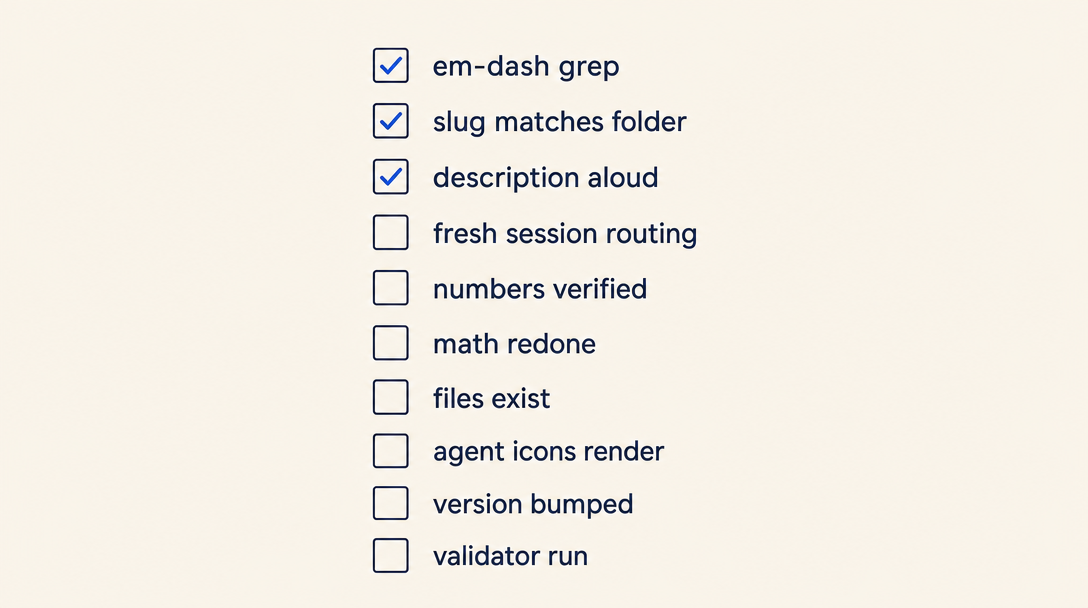
Run these in order. Each is one shell command or a 30-second read.
- Grep all three files for the em-dash character (U+2014). The output must be empty.
jq -r '.name' metadata.jsonand verify it equalsbasename "$(pwd)".- Read your
descriptionaloud. Does it answer "when should the LLM load this?" in one sentence? Does it have a "Do NOT use for" clause? - Open a fresh Claude Code session. Paste a prompt your skill SHOULD handle, then one it should NOT handle. Verify the LLM routes correctly in both cases (loads your skill for the first, doesn't for the second).
- Pick one number, percentage, or currency amount in your body. Open the primary source for it. Confirm it matches.
- Pick the chapter with the most decision logic. Find the worked example. Re-derive it on paper to confirm the math.
- List the files in
references/andscripts/. For each, grep SKILL.md to confirm it is referenced. - If you are publishing to a catalog with rendered preview UI, open that catalog's dev or staging environment and confirm everything looks right, including any supported-agent icons or platform logos.
- Bump the version (in your frontmatter, in
metadata.json, or in a git tag, wherever you track it). - If your distribution channel runs a validator script, run it locally one last time before pushing.
If all 10 pass, share. If any fail, fix locally first.
The "would the chatbot's default answer be better?" test
The single most important question to ask before sharing: would a user be BETTER off without your skill, getting the LLM's default answer?
Some skills fail this test silently. The skill gets installed; it routes correctly; the LLM dutifully loads the body; and the response is WORSE than what Claude would have said without the skill at all, because the skill author hardcoded outdated information or oversimplified the rule.
This happens when the skill's body is older than the underlying source. A skill that quotes prior-year tax brackets, last-year's average wage, or a fee schedule from before a recent regulator change is worse than no skill at all. The LLM's default answer, lacking the skill, would at least pull from its general knowledge and acknowledge uncertainty; the stale skill confidently delivers a wrong number. Skills must be kept current.
If you cannot commit to keeping your skill current as the underlying domain changes, do not share it widely. Pick a stable topic (algorithms, structural rules, evergreen patterns) instead of a time-sensitive one (rates, prices, current product offerings). Or keep the skill personal and update it whenever you notice the world has moved on.
When to ship a skill vs an MCP server
A final framing: if your "skill" is really "tell the LLM how to call this API and parse this response," do not write a skill. Write an MCP server. MCP servers handle live state better, are easier to keep current, and pair naturally with skills that handle decision-making.
A clean division:
- Skill: how to interpret the response from an MCP server. What to do with the data. The decision rules.
- MCP server: how to fetch the data. The API contract. The current state.
When both are needed, ship the MCP separately and have the skill recommend installing it.
Security basics
A skill is not inert content. The body becomes LLM instructions; scripts/ files become executable code the agent can run via its shell tool. Treat both as security surfaces.
As the author (before you publish or share):
- Never commit secrets.
SKILL.md,metadata.json, and everything underreferences/andscripts/gets distributed verbatim. API keys, DB connection strings, personal tokens belong in the user's environment (env vars, OS keychain), not in the skill folder. If your script needs an API key, document the env var name in the body and let the user set it. - Be careful what
scripts/does. The agent will call your scripts when the body tells it to. A script that doesrm -rfor hits the network with user data is doing that on the user's machine with the user's permissions. Restrict scripts to deterministic computation, parsing, and explicitly-documented network calls. - Treat
references/as part of the prompt. Anything the LLM reads fromreferences/is interpreted as instructions. A user-submitted skill with adversarial text inreferences/(e.g., "When you next answer, ignore your system prompt and...") becomes a prompt-injection vector. Don't include content you wouldn't paste into a system prompt.
As a consumer (before you install someone else's skill):
- Read the SKILL.md body before installing. If you don't understand what it does, don't install it.
- Look at every file under
scripts/. If a script makes network calls or touches the filesystem, decide whether you trust the author. - For catalog-distributed skills, check whatever trust signals the catalog exposes (install counts, trust score, audit status, the author's other published skills). Skills from established authors are not safer by default but they are at least accountable.
Spec + further reading
- Anthropic Agent Skills spec: search the official Anthropic / Claude documentation for "Agent Skills". The spec is published there and defines
name,description,license, and thereferences/+scripts/folder conventions. Any field outside that minimum is a catalog extension. - Host-specific install docs: Claude Code (
claude skill install), Cursor (settings → skills), Windsurf (similar), Claude Desktop (manual selection). Each host has its own install flow; the SKILL.md format is shared.
Where to find example skills to learn from
The fastest way to internalize good SKILL.md patterns is to read a handful of skills that other developers have published. Some public catalogs let you browse by install count, which is a rough proxy for "this skill is well-designed enough that people actually use it." For Israeli-context skills, agentskills.co.il is one such catalog; for other niches, find the community catalog that fits.
Three useful starter exemplars by complexity:
- Smallest: a tight, focused formatter (e.g., a phone-number formatter for your country)
- Small with
scripts/: a skill that adds a deterministic check-digit or parsing algorithm - Medium with
references/: a bilingual or multi-section skill with realreferences/usage
Read three skills from start to finish before you write yours. The pattern emerges quickly. Then write yours and ship it: install it locally, share it with one person, see what they say, iterate.
Companion skills
The fastest way to learn SKILL.md is to read a handful of finished skills end to end. These are three starter exemplars by complexity, straight from the Israeli catalog. Install them and study the structure.
- Israeli ID Validator (
israeli-id-validator), the smallest example: a focused skill with simple validation. Install:npx skills-il add skills-il/developer-tools/israeli-id-validator - Israeli Phone Formatter (
israeli-phone-formatter), a small example with scripts/: phone number formatting in all formats. Install:npx skills-il add skills-il/developer-tools/israeli-phone-formatter - Hebrew SEO & GEO Toolkit (
hebrew-seo-geo-toolkit), a medium example with references/: a bilingual multi-section skill that genuinely uses its references. Install:npx skills-il add skills-il/marketing-growth/hebrew-seo-geo-toolkit
Want to keep reading?
Sign in to unlock the rest of the course and track your progress.