Getting Started Guide
A getting-started guide for Israeli AI agent skills: how to find, install, and run them in your project with Claude Code, Cursor, GitHub Copilot, Windsurf, OpenClaw, and ChatGPT. Free.
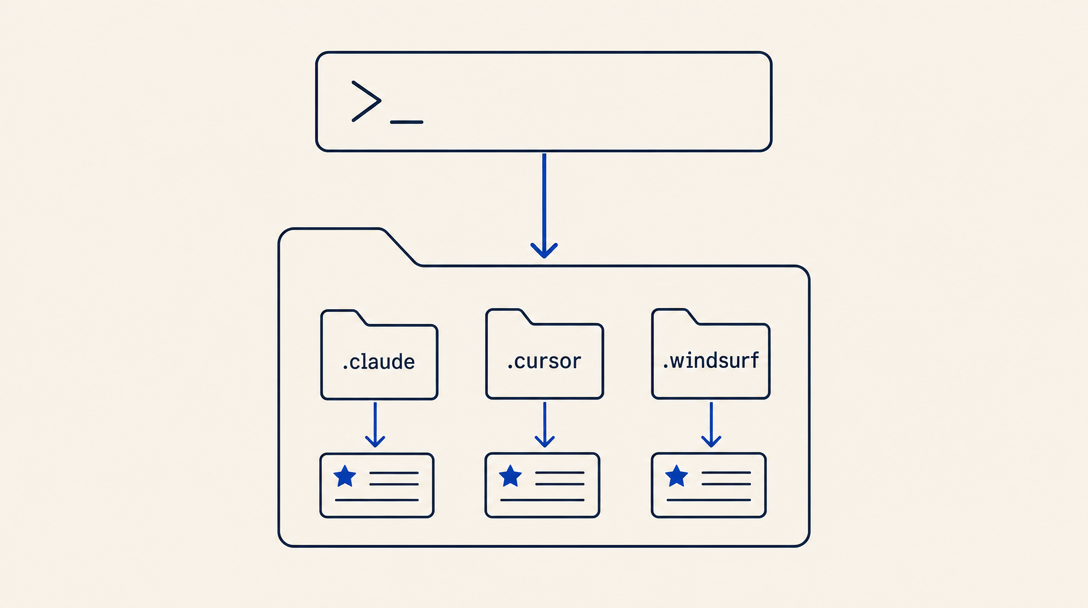
What is a Skill?
A skill is a set of instructions, packaged as a simple folder, that teaches an AI agent how to handle specific tasks or workflows. Skills are one of the most powerful ways to customize your AI agent for your specific needs. Instead of re-explaining your preferences, processes, and domain expertise in every conversation, skills let you teach your agent once and benefit every time.
Skills IL is a secure directory of AI agent skills built for the Israeli community. Skills are tailored for working with Hebrew, Israeli regulations, and local government services, and work across multiple AI agents: Claude Code, Cursor, GitHub Copilot, Windsurf, OpenCode, Codex, OpenClaw, and Antigravity. You can also use skills on Claude.ai, Claude Desktop, and ChatGPT by uploading a ZIP file.
Prerequisites
Before you start, make sure you have:
- An AI agent (coding assistant) - Skills work inside AI coding agents. If you haven't installed one yet, start with one of these:
- Claude Code - Anthropic's code agent (CLI)
- Cursor - AI-powered code editor
- GitHub Copilot - GitHub's AI coding assistant
- Windsurf - AI-powered code editor
- An existing project - A project folder you're working in (the skill gets installed inside your project)
- A terminal - Access to a command line
Installation
Not a developer? If you use Claude.ai, Claude Desktop, ChatGPT, or Manus (no terminal), see the no-code install guide.
1Choose a Skill
Browse the skill directory and find a skill that fits your needs. You can filter by category, supported agent, and tags.
2Install
The simplest way to install a skill is with the universal CLI. The command automatically detects which AI agents are installed on your system and installs the skill to all of them:
npx skills-il add skills-il/developer-tools --skill your-skillYou can also target specific agents with the -a flag:
npx skills-il add skills-il/developer-tools --skill your-skill -a claude-code -a cursorThe npx skills-il add command works with every agent: Claude Code, Cursor, GitHub Copilot, Windsurf, OpenCode, Codex, OpenClaw, Antigravity, and more. The CLI detects installed agents through project directories (like .claude/, .cursor/, etc.).
3What Happens After Installation?
After running the install command:
- Skill files are saved in your project - typically in a folder like
.claude/skills/,.cursor/skills/, or a similar directory depending on your agent - Your agent detects the skill automatically - the next time you start a conversation, the agent will know how to use the skill when relevant
- No additional configuration needed - most skills work immediately without extra setup
Some skills require specific configuration (like API keys or environment variables). If so, instructions will appear on the skill page and in the installed SKILL.md file.
4Using a Skill
After installation, just work with your agent as usual. The agent will use the skill automatically when the task is relevant. For example:
- If you installed a localization skill, the agent will use it when you ask to add Hebrew or RTL support
- If you installed a tax skill, the agent will use it when working with invoices or tax reports
- If you installed a developer tools skill, the agent will use it during everyday development workflows
You can also trigger a skill directly by mentioning its name in your message to the agent.
Supported Agents
Skills IL supports the following agents:
| Agent | Status |
|---|---|
| Claude Code | Fully supported |
| Cursor | Fully supported |
| GitHub Copilot | Fully supported |
| Windsurf | Fully supported |
| OpenClaw | Fully supported |
| OpenCode | Supported |
| Codex | Supported |
| Antigravity | Supported |
| Claude.ai | Fully supported |
| Claude Desktop | Fully supported |
| ChatGPT | Supported (Enterprise / Edu) |
Categories
Skills are organized into 12 categories:
- Tax & Finance - Invoicing, income tax, VAT, and Israeli financial systems
- Localization - Hebrew, RTL, translation, and cultural adaptation
- Government Services - Population authority, national insurance, government systems
- Security & Compliance - Privacy protection, GDPR, and Israeli regulations
- Communication - SMS, email, and customer communication
- Developer Tools - Development utilities with Israeli adaptations
- Legal Tech - Contracts, court filings, regulatory compliance
- Education - Bagrut exams, academia, online learning
- Health Services - Kupot Cholim, pharmacy, telemedicine
- Food & Dining - Kashrut, supermarket prices, restaurants
- Marketing & Growth - Campaigns, analytics, growth optimization
- Accounting - Double-entry bookkeeping, bank reconciliation, financial reports
FAQ for Beginners
Do skills cost money?
No. All skills on Skills IL are free and open source.
Can a skill harm my code?
Every skill undergoes automatic security analysis and receives a trust score. You can see the full security breakdown on each skill's page. Skills are instruction files only, not executable code running on your machine.
Can I install multiple skills?
Yes. You can install as many skills as you need. The agent will know which skill to use based on the task at hand.
Do I need to update skills?
Skills are updated through the sync system. You can re-run the install command to get the latest version.
What's the difference between a skill and an MCP?
A skill is a text-based instruction set that teaches the agent what to do. An MCP (Model Context Protocol) is a server that gives the agent access to external tools and data sources. You can use both together.
What's Next?
- How to Build a Skill - Comprehensive guide to building a skill from scratch
- Skill Design Patterns - Proven patterns for effective skills
- Testing & Distribution - How to test and distribute skills
- Skill Creator - Generate your first skill in seconds
- Skill Authoring Best Practices (Anthropic) - Official Anthropic guide for writing effective skills